Booking slots
Publish the time first. Attach the client when it is claimed.
Open a specific instructor window for public booking instead of creating an empty private-session record or answering every availability message by hand.
A Mojo booking slot carries the instructor, start time, duration, capacity, title, public notes, and public-booking choice. Once claimed, it becomes a private session.
Free for 15 days with no credit card required, then €10/month.
One owner-side opening
Keep the slot's operating details together.
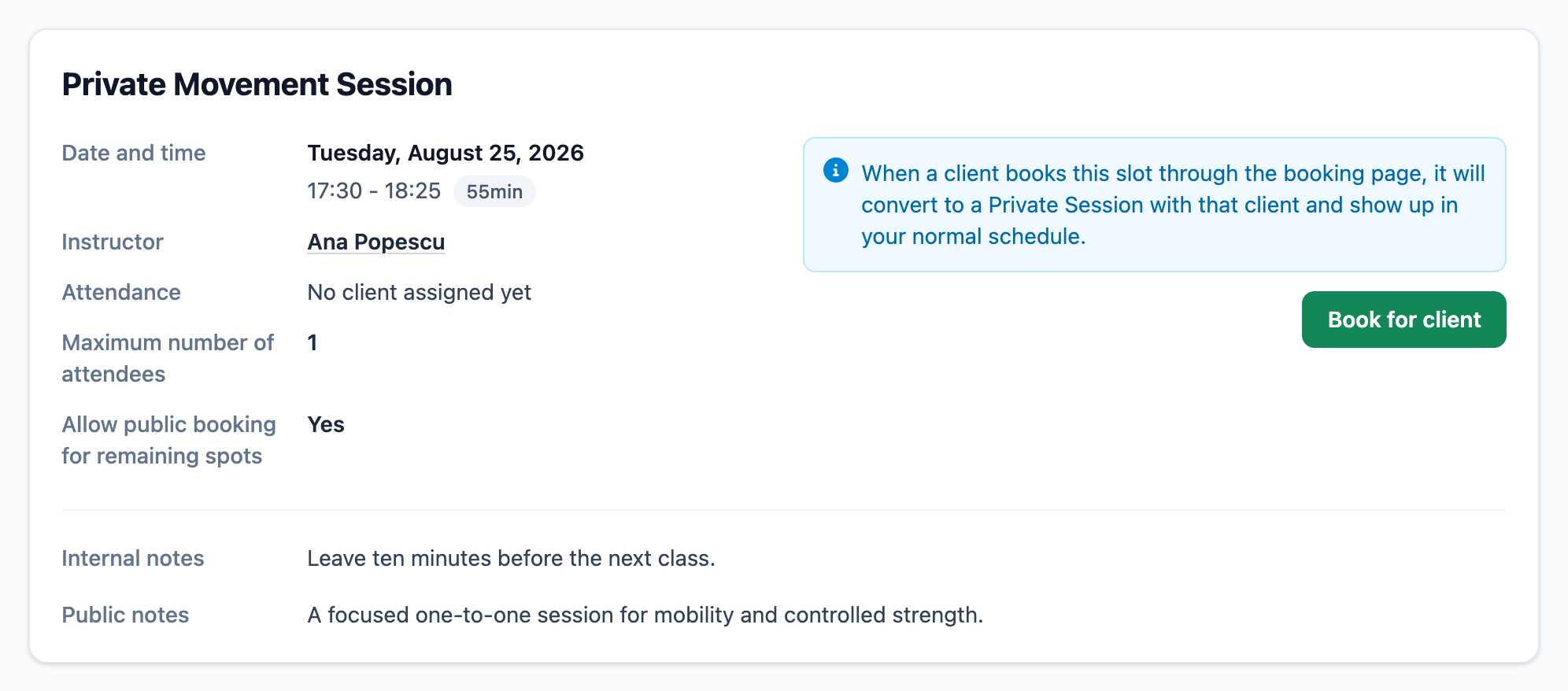
The owner record shows who delivers the session, when it begins, how long it lasts, whether it is public, and what the client should know.
-
01
Assign the instructor
Every slot belongs to one active team member and stays visible in the shared studio schedule.
-
02
Set the client-facing facts
Title, time, duration, capacity, and public notes travel with the opening.
-
03
Keep internal context private
Internal notes remain owner-side while public notes describe the appointment to the client.
From availability to appointment
Let one opening become one normal private session.
The slot handles availability; the converted private session handles the booked client.
-
1
Create the opening
Choose the instructor, date, start time, duration, capacity, title, notes, and whether the remaining spot is publicly bookable.
-
2
Publish it with private sessions
Eligible future slots appear in the Private sessions tab of the studio's public booking page.
-
3
Let the client claim it
The normal identity, membership, and booking-status rules continue through the public flow.
-
4
Continue with a private session
A successful booking converts the slot into a confirmed private session and creates the client's attendance record.
The studio can also use Book for client from the owner record. Mojo does not match clients to openings or optimize instructor availability automatically.
Before you publish availability
Booking slot questions
How is a booking slot different from a private session? +
Where do clients see booking slots? +
Can the studio book a slot for a client? +
Can a slot repeat? +
Does Mojo choose the best instructor or time? +
Open the next appointment
Publish availability without losing the booked client record.
Create the slot, share the studio booking page, and let the claimed opening continue as a private session.
15 days free. No credit card required. €10/month after trial.
Too many bookings happening in DMs?
Share your business name and email and we'll send a few practical ways boutique studios move bookings out of messages and into one clean booking link.