Booking link in bio
Give every social profile one clear next step: book.
Put the studio's public Mojo page in an Instagram, TikTok, Threads, or other profile and send interested clients to live booking choices instead of another manual reply.
The link is the studio's existing public booking page. Mojo does not need a special Instagram integration, and clients do not install an app.
Free for 15 days with no credit card required, then €10/month.
The social handoff
Move from profile visit to the studio's real booking flow.
The social network supplies the click; Mojo owns the booking page that follows.
-
1
Copy the studio's public URL
Every active Mojo studio has a public booking page with its business name and enabled booking surfaces.
-
2
Place it in the profile
Use the same URL in an Instagram bio, another social profile, a website button, a DM, or a QR code.
-
3
The client lands on current choices
The mobile page shows the studio, available group classes, private-session options when published, and public membership plans when configured.
-
4
The normal booking rules continue
The client chooses an activity, completes any first-visit email and profile steps, and receives the status allowed by the studio's configuration.
Mojo does not edit the social profile, publish the link automatically, or provide Instagram-specific reach or conversion analytics.
The page after the tap
Let the studio identity and next available class answer the click.
The client reaches a mobile page with the studio name, enabled booking tabs, date navigation, class details, instructor, and booking action.
See the complete online booking mechanism →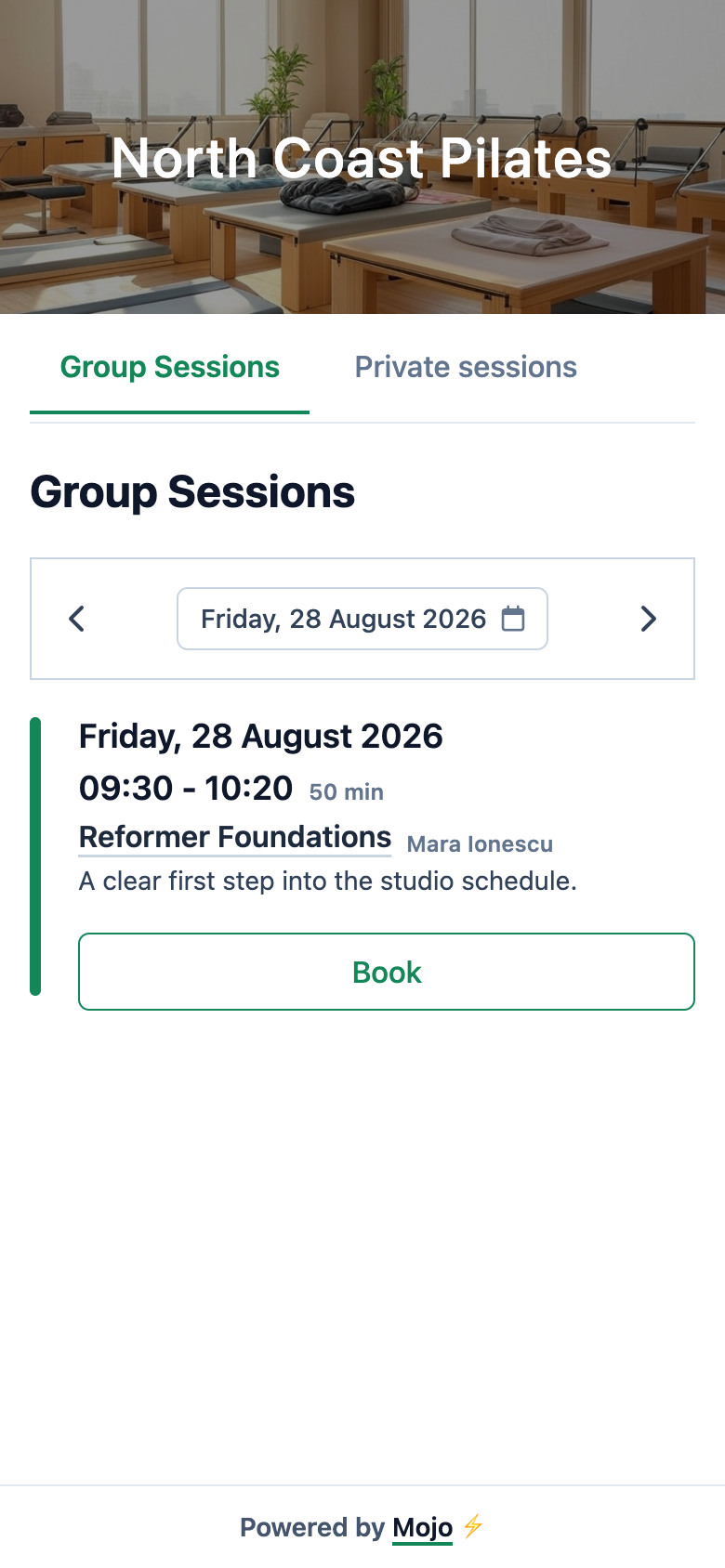
-
01
Keep the studio recognizable
The public page uses the studio name and its current public schedule rather than sending clients to a generic marketplace.
-
02
Show only published options
Group classes, private-session availability, and plans appear only when the studio has configured and published them.
-
03
Continue into the full booking mechanism
Identity, membership, capacity, waitlist, and booking-status rules remain the same as any other visit to the public page.
Why the link is useful
Use one destination wherever a client discovers the studio.
The value comes from a stable handoff to live product state, not from an invented channel-specific conversion promise.
-
01
Replace the availability reply
The profile can point directly to the same public schedule the studio already maintains instead of requiring a new DM for every class question.
-
02
Keep every channel consistent
A bio, website, QR code, and direct message can share the same studio URL while the booking page reflects current published availability.
-
03
Send the result into operations
A completed booking becomes the same owner-side attendance record used for capacity, review, reminders, membership coverage, and attendance.
Before you update the profile
Booking link questions
Is this an Instagram integration? +
Can the same link be used outside Instagram? +
Do clients need the Mojo app? +
Does every client book instantly? +
Does Mojo track Instagram reach and conversion? +
Can the studio change what the page shows? +
Update the next profile
Give the studio's audience a booking destination.
Publish the schedule, copy the public link, and let each profile visit continue into the real Mojo booking flow.
15 days free. No credit card required. €10/month after trial.
Too many bookings happening in DMs?
Share your business name and email and we'll send a few practical ways boutique studios move bookings out of messages and into one clean booking link.