
Attendance tracking
Close the class with every client in the right state.
Review confirmed and in-review bookings, record attended or no-show outcomes, and keep the result attached to the event, client, and membership.
- One roster for booking and attendance state
- Membership context beside each client
- Auditable manual status changes
Free for 15 days with no credit card required, then €10/month.
The working roster
Review booking status, attendance actions, and membership coverage together.
The owner opens the event, finds the client, and records the current outcome without moving the class into a separate attendance tool.
See how the class reaches this roster →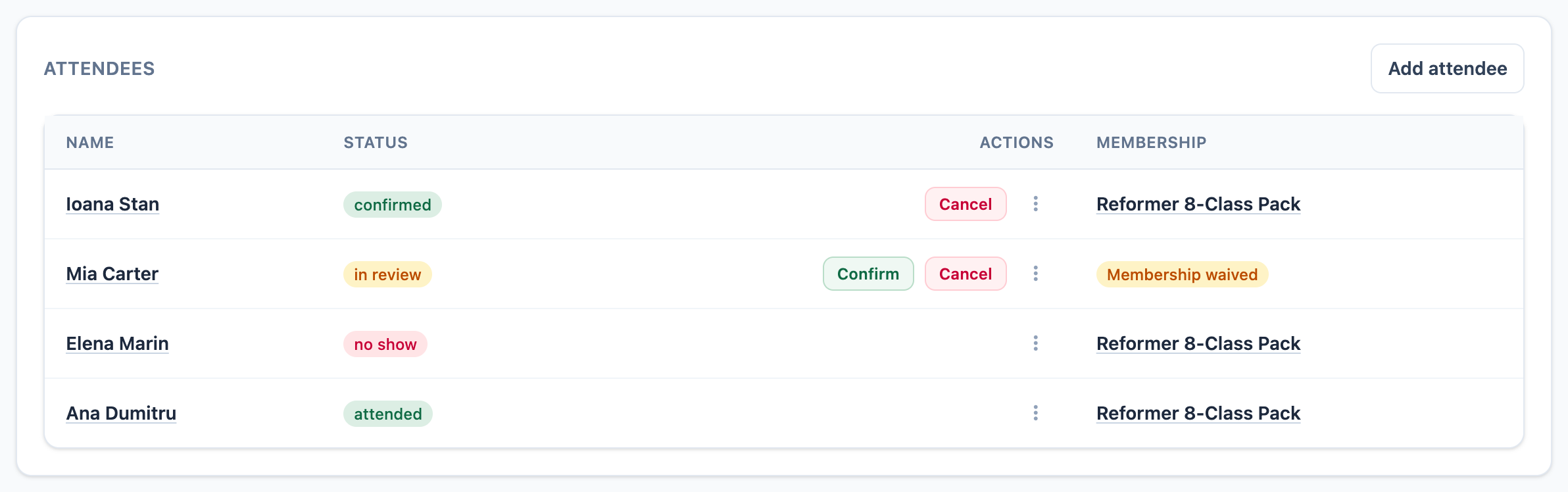
-
01
Resolve records that need review
In-review bookings remain visible with the actions the owner can take next.
-
02
Record attended or no-show
Eligible records can move to the outcome that actually happened, while cancelled and waitlisted states remain distinct.
-
03
Keep coverage visible
The roster links an assigned membership or shows the documented waiver instead of hiding the coverage decision.
What the status changes
The outcome stays useful after the class ends.
Attendance is not only a label; it affects capacity history, membership usage, and the record an owner can audit.
-
01
Keep booking and attendance distinct
Confirmed and in-review describe live bookings. Attended and no-show describe the completed client outcome. Waitlisted and cancelled records remain separate.
-
02
Apply the right membership consequence
Confirmed and in-review records reserve a unit. Attended and no-show records consume one. A waitlisted record does not reduce the available balance.
-
03
Retain the decision trail
Status changes remain connected to the attendance, event, client, acting user, and audit entry so the studio can inspect what changed.
Before you close the roster
Attendance tracking questions
Which attendance states does Mojo record? +
Which bookings count toward class capacity? +
When does an attendance use a membership session? +
Can the owner book someone without membership coverage? +
Does attendance tracking automatically prevent no-shows? +
Can the studio inspect status changes? +
Close the next class
Give every booking a clear outcome.
Open the roster, record what happened, and keep membership usage and audit context attached.
15 days free. No credit card required. €10/month after trial.
Too many bookings happening in DMs?
Share your business name and email and we'll send a few practical ways boutique studios move bookings out of messages and into one clean booking link.