
Pilates class scheduling app
Keep today's Pilates classes in reach.
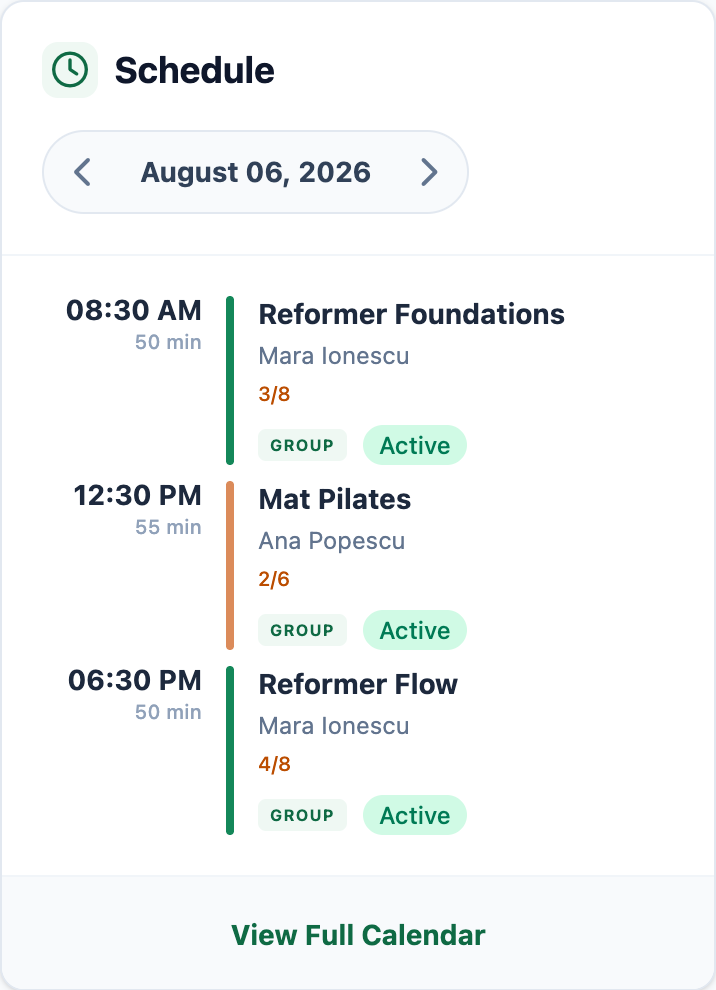
Open Mojo from your phone to review class times, instructors, booked places, and status. Tap into the class when you need its client list, waitlist, reminders, or attendance.
Free for 15 days with no credit card required, then €10/month.
From a Pilates owner
The working schedule stays useful between classes.
The owner can check the day and open the class that needs attention without returning to a desk.
"Mojo changed everything for our Pilates studio. I used to juggle DMs, spreadsheets, and my memory just to know who was coming in. Now I check the calendar once and I'm set for the day. Our clients love how organized everything feels."
Pilates class scheduling app questions
What is a Pilates class scheduling app? +
Do owners or clients need to install an app? +
What can I see from my phone before a Pilates class? +
How is this different from Pilates scheduling software? +
How do waitlists work when I am checking a full class? +
Can reminders and attendance stay with the class? +
Why choose Mojo
The schedule stays useful after you leave the desk.
Keep the daily view readable on your phone, then open the exact class that needs a booking or class-day decision.
-
1
One mobile list keeps the day readable
Review class times, instructors, duration, booked places, and status without reconstructing the schedule from messages.
-
2
Capacity keeps its class context
Open the session to see the client list, booking states, capacity, and waitlist demand attached to that class.
-
3
Follow-through is already connected
Automated reminders, memberships, class packs, integrated payments, notifications, and attendance stay close to the class record.
Start with the next class you already run, check it on your phone, then share the studio booking page.
Inspect the workflow
Follow the mobile schedule into the tools behind each class.
Go deeper into the working calendar, group-class controls, instructor assignments, or automated reminders.
- 01 Studio calendar See the daily and weekly timetable with class times, instructors, booked places, and schedule changes. →
- 02 Group sessions Review capacity, booking status, the client list, waitlist, and attendance for each class. →
- 03 Staff management Keep instructor assignments attached to the sessions they teach. →
- 04 Automated reminders Send eligible confirmed clients an email reminder before class without following up one by one. →
For Pilates operators
Useful reads for the decisions around the schedule.
Two perspectives on the demand behind boutique classes and the pricing decisions that support them.
Growth
The Rise of Social Fitness
Social fitness is now a measurable growth driver. Here is the data and operating playbook for studio owners who want stronger retention, referrals, and fill rates.
Strategy
How to Raise Prices Without Losing Your Best Clients
Price increases feel risky, but they do not need to trigger churn. Use this step-by-step framework to improve margins while protecting loyalty.
Start with today's classes
Put your Pilates schedule in reach from your phone.
15 days free. No credit card required. €10/month after trial.
Too many bookings happening in DMs?
Share your business name and email and we'll send a few practical ways boutique studios move bookings out of messages and into one clean booking link.